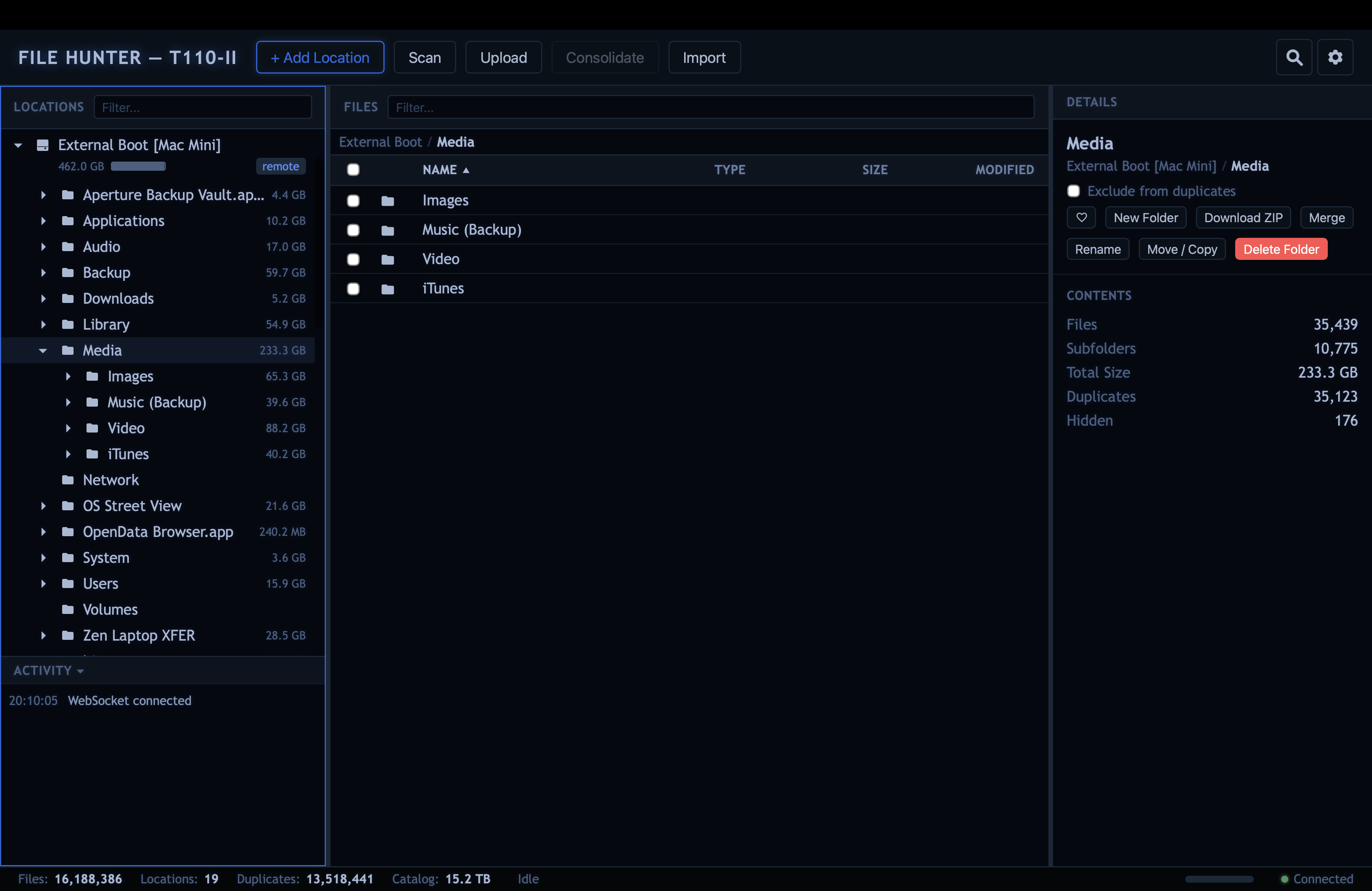
File Hunter is a self-hosted, web-based file browser, catalog, search and deduplication tool. It catalogs files across transient storage locations · USB drives, network shares, DVD-ROMs, local directories · so they can be searched, compared, and deduplicated even when the media is disconnected.
curl -fsSL https://filehunter.zenlogic.uk/install | bash
usb It remembers drives you disconnect
Unplug a USB drive, unmount a network share, eject a DVD; File Hunter keeps the full catalog. Browse every file, search by name or tag, review duplicates, and plan consolidation - all without reconnecting anything. When the drive comes back, a rescan picks up where it left off. No other file manager does this.
lan Runs headless, works everywhere
File Hunter is a web app. It runs on a server, a Raspberry Pi, a NAS, or your laptop and you can access it from any browser on any device. There is no desktop app, no Electron wrapper, no client to install. SSH into your server, start File Hunter, and manage your files from the couch.
browse See where your space went
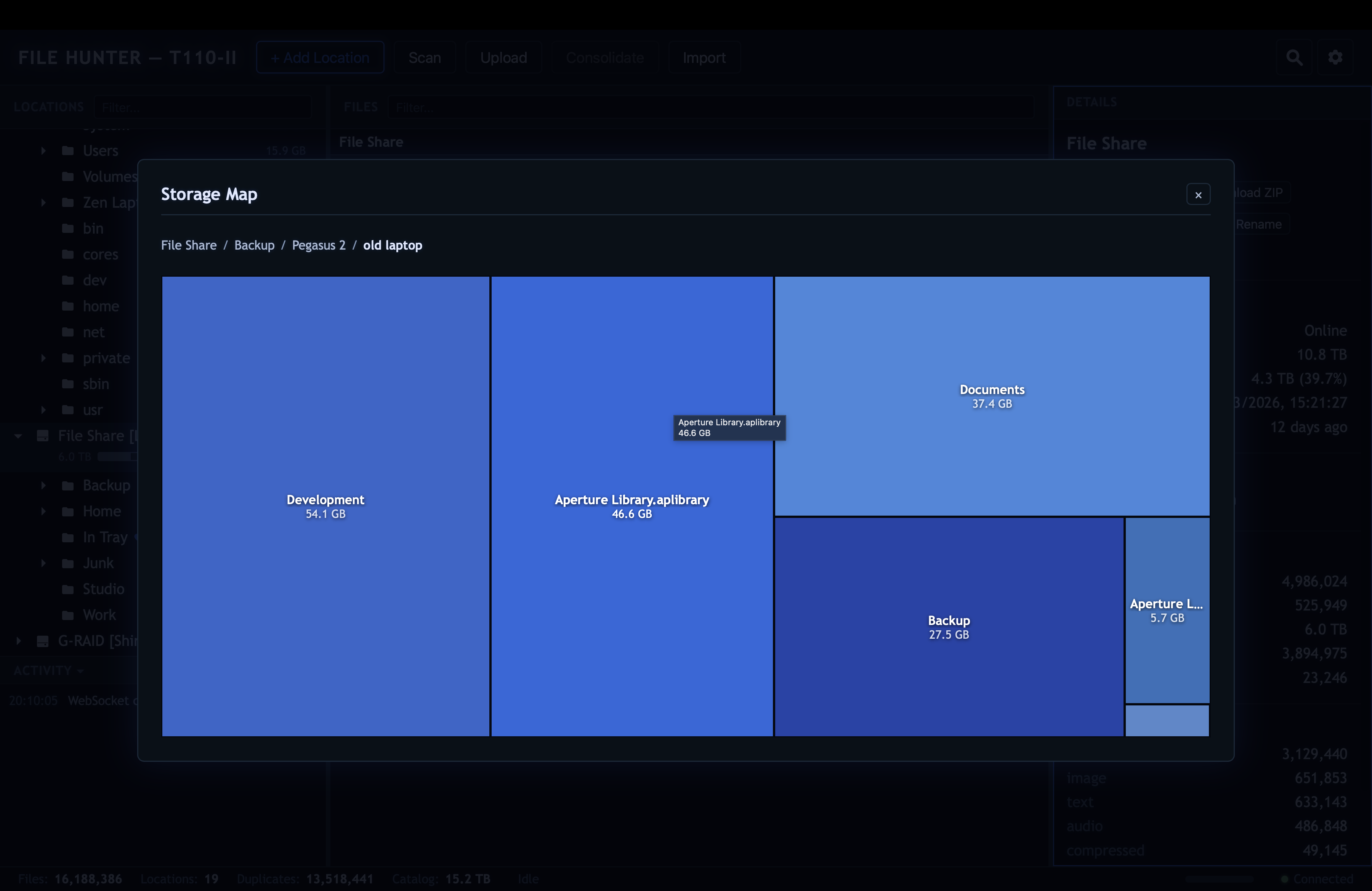
Open the Storage Map for any location and get an interactive treemap of disk usage. The biggest folders jump out immediately. Drill into subfolders, see individual large files, and click any file to navigate straight to it in the main UI. The colour palette adapts to your chosen theme.
search Deduplicate with confidence
A three-tier hashing strategy - file size as a pre-filter,
xxHash64 partial hash for speed, SHA-256 full hash for certainty
- identifies exact duplicates across all your locations with
minimal I/O. Then consolidate them: the canonical copy stays, every
duplicate is replaced with a .moved stub, and a
.sources file records every original path. Full audit
trail, nothing lost.
hard_disk Scales to millions of files
Built for real-world scale. The UI stays responsive during scans - page refreshes, location adds, and all interactions work without delay. Lazy tree loading, paged file lists, incremental rescans, and an in-memory stats cache keep everything fast regardless of catalog size.
Multi-location catalog
Register any folder as a named location - USB drives, DVD-ROMs, network mounts, local directories. Multiple locations per physical disk. All browsable from one interface.
Offline browsing
The full catalog persists locally in SQLite. Disconnect a drive and keep browsing, searching, and reviewing its contents as if it were still there.
Duplicate detection
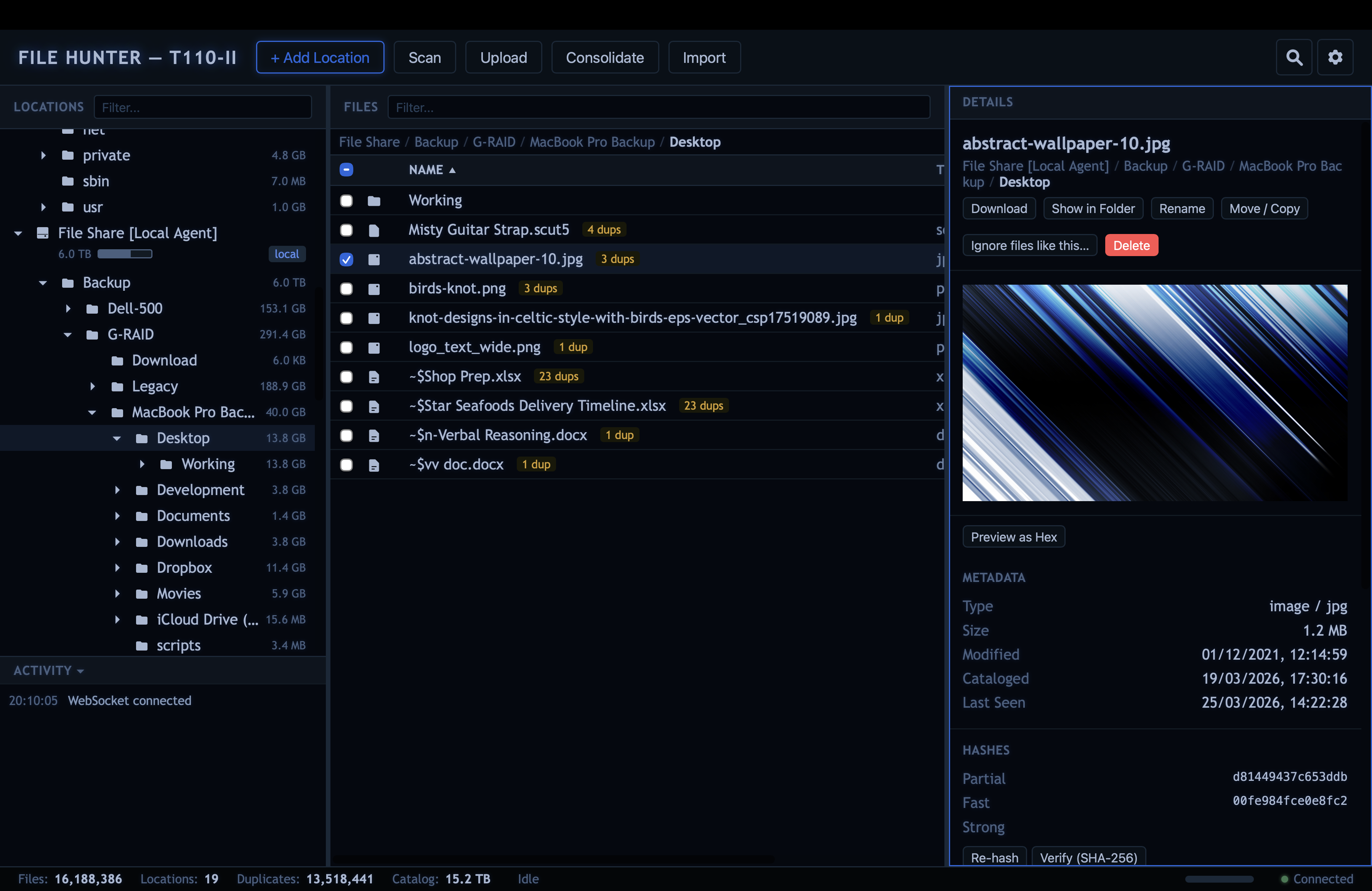
Three-gate hashing: size filter, xxHash64 partial, SHA-256 full. Only files that actually match get the expensive full hash. Works across all locations.
Consolidation
Keep one copy, stub the rest. Two modes: keep in place or copy to a chosen destination. Hash-verified copies. .moved stubs and .sources metadata for full provenance. Every operation writes a CSV result log with source and destination locations, per-file status, and error details - viewable as a table directly in the UI.
Merge folders
Merge entire locations or folders with copy or move mode. Preview step shows exactly what will happen before anything runs. Unique files transfer preserving structure, duplicates are stubbed at the source. Collision-safe naming. Full CSV result log for every operation.
Storage treemap
Interactive squarified treemap per location. Drill into folders, see individual large files, click to navigate. Theme-aware colour palette cycles through 8 custom colours.
Powerful search
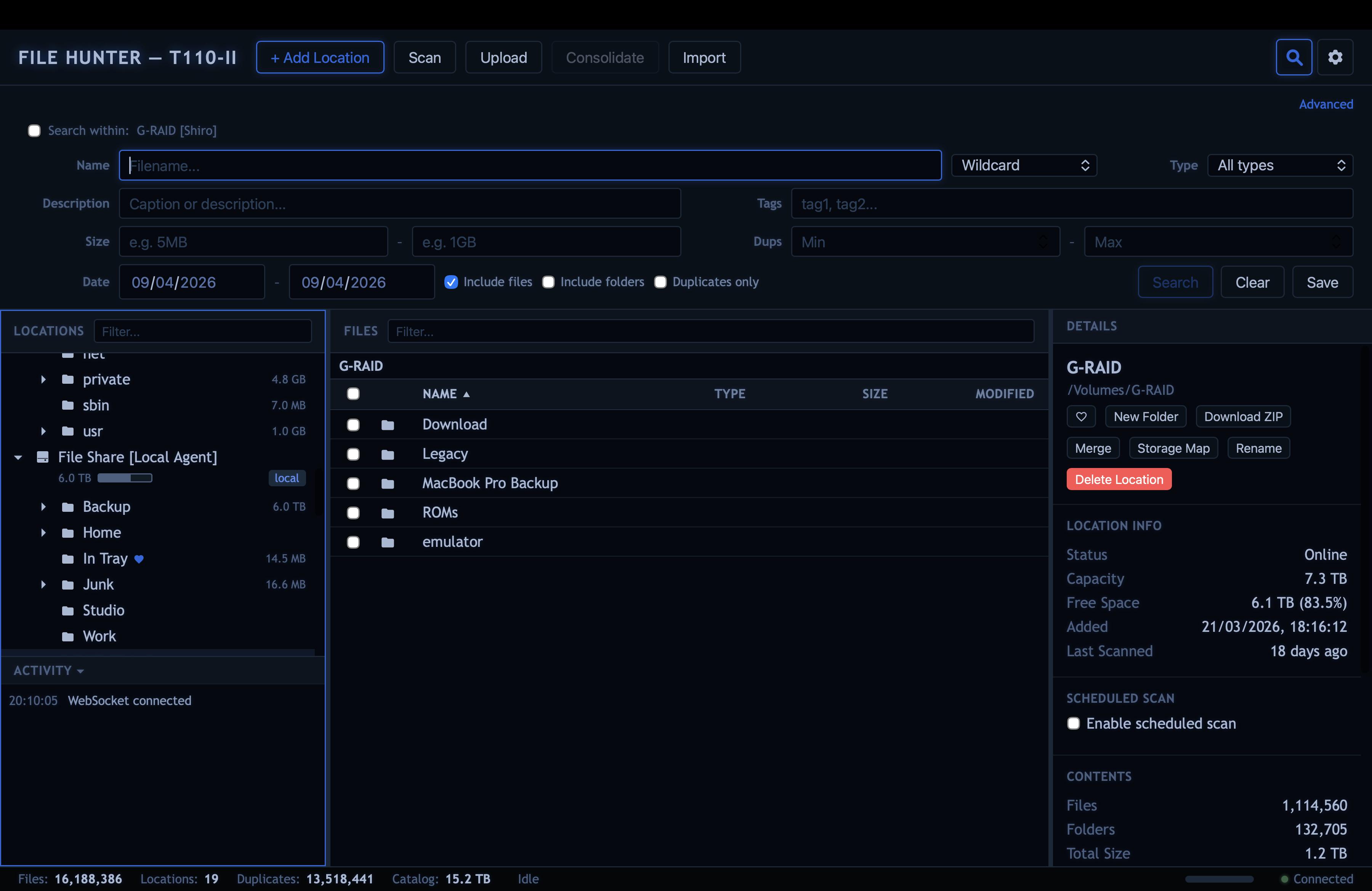
Basic mode searches by filename, file type, tags, description, size range, date range, and duplicate count. Advanced mode builds complex queries with multiple include/exclude conditions across all fields. Scope any search to a single location or folder. Results span online and offline locations. “Show in Folder” jumps straight to any result.
Inline previews
Preview images, play video and audio, read text files, scroll through PDFs, view CSV files as tables, and inspect any file byte-by-byte in the hex viewer - all inline in the detail panel. Full-screen zoom. No external programs needed.
Slideshow & playlist
One click launches a full-screen slideshow for images or playlist for video. Auto-advances with smooth crossfade transitions. Mark files for delete, consolidate, tag, or move as you browse, then review and confirm when you close. Operations run in the background; the UI stays responsive throughout.
Upload & deduplicate
Drag and drop files or use the upload button. Files are hashed on arrival - duplicates are automatically detected and replaced with stubs.
Scheduled scans
Set per-location scan schedules: pick days of the week and a time. Scans enqueue automatically and run identically to manual scans. Offline locations are silently skipped.
Background scanning
Scans run as server-side background tasks. Close the browser, come back later - your scan keeps going. Scan a single subfolder instead of the whole location when you only need a partial update. Incremental rescans skip unchanged files. If the server restarts mid-scan, interrupted scans automatically re-queue and resume.
Multi-user auth
Token-based authentication with PBKDF2 password hashing. Multiple users, first-run setup wizard, session management. All users share full access.
Tags & descriptions
Add free-text descriptions and tags to any file. Searchable metadata that persists in the catalog even when drives are offline.
Batch operations
Multi-select files with checkboxes, Shift+click, or Ctrl+click. Bulk delete, move, tag, or download as ZIP. Folder multi-select too.
Full file management
Move, copy, rename, and delete files and folders. Create new folders. Download individual files or entire folders as ZIP. Cross-location operations. Breadcrumb navigation for quick traversal.
Duplicate exclusion
Exclude entire folder trees from duplicate detection. System folders, caches, build artefacts - mark them once and they stop cluttering your duplicate lists. The exclusion persists across rescans.
Themes
Built-in themes range from retro CRT terminals to clean corporate light modes. Create and edit your own in the theme editor · every theme controls colours, fonts, glows, and treemap palette.
Keyboard navigation
Full keyboard support across all three panels. Arrow keys, Tab cycling, Enter to activate, shortcuts for search and filters. Power-user friendly.
Real-time updates
WebSocket connection streams scan progress, upload status, and all mutations to every connected browser. Multiple users see changes instantly.
Scan queue
Queue up multiple location scans and they run one after another. Start five, close the browser, come back - the queue kept going. The queue survives server restarts - pending and interrupted scans pick up where they left off.
Stale file detection
Rescans detect files that have disappeared since the last scan and mark them stale. Your catalog stays honest about what’s actually on disk.
Ignore rules
Define patterns to exclude files from duplicate detection - by extension, name pattern, or size. Scope rules globally or per-location. Ignored files stay in the catalog but stop cluttering your duplicate lists.
| File Hunter | dupeGuru / Czkawka | WinDirStat / ncdu | DiskCatalogMaker | Everything | |
|---|---|---|---|---|---|
| Web UI (headless) | ✓ | ✕ | ✕ | ✕ | ✕ |
| Offline catalog | ✓ | ✕ | ✕ | ✓ | ✕ |
| Duplicate detection | ✓ | ✓ | ✕ | ✕ | ✕ |
| Consolidation / dedup on disk | ✓ | partial | ✕ | ✕ | ✕ |
| Storage treemap | ✓ | ✕ | ✓ | ✕ | ✕ |
| File previews | ✓ | ✕ | ✕ | limited | ✕ |
| Scheduled scans | ✓ | ✕ | ✕ | ✕ | ✕ |
| Multi-user auth | ✓ | ✕ | ✕ | ✕ | ✕ |
| Scales to millions of files | ✓ | slow | ✓ | slow | ✓ |
| Cross-platform | ✓ | ✓ | varies | Mac only | Windows only |
| Remote agents (Pro) | ✓ | ✕ | ✕ | ✕ | ✕ |
| Free & open source | ✓ | ✓ | ✓ | ✕ | freeware |
Home lab operators
Manage files on a headless server from any browser. No desktop environment needed. Runs on a Pi.
Photographers & videographers
Catalog shoots across dozens of external drives. Find that one photo even when the drive is in a drawer.
Data hoarders
Finally see what you have, where it is, and how much of it is duplicated. Reclaim terabytes.
Sysadmins
Audit storage usage across backup drives and archive media. Schedule scans, review from anywhere.
lock The core stays free
Everything above is the free version. It is MIT-licensed, open source, and it will stay that way. File Hunter Pro builds on top of the free core - it does not replace it. Every improvement to the core benefits both editions. You will never hit an artificial paywall in features you already have.
monitor Remote agents
Install a lightweight agent on any machine - a NAS, a media server, a remote workstation. The agent registers with your File Hunter server over WebSocket and keeps a persistent connection. Its local drives appear as locations in your catalog alongside your directly-attached storage. Browse, search, and preview files on remote machines as if they were local.
rss_feed Stream content from anywhere
Preview images, play video, and read documents stored on a remote agent - streamed on demand through the server. Range requests work, so you can seek through a two-hour video on another machine on the network without downloading the whole file first.
search Remote scanning & deduplication
Trigger scans on remote agents from the server UI. Files are hashed on the agent and ingested into your central catalog. Duplicates are detected across all machines - local and remote - using the same three-gate hashing strategy. One catalog, every drive, every machine.
check_circle Live connection status
Agent locations show online/offline badges in real time. If an agent drops off the network its locations go offline in every connected browser within seconds. Reconnection is automatic. Offline agent locations behave like any other offline drive - the full catalog, file metadata, and hashes remain searchable and browsable until the agent comes back.
language WebDAV access (read-only)
Mount your entire catalog as a network drive. A read-only WebDAV server presents every location · local and remote · as a virtual filesystem. Connect from Finder, Windows Explorer, or iOS Files using your File Hunter credentials. Browse and open files from any app without touching the web UI.
# Built with Python (Starlette + uvicorn),
SQLite in WAL mode, and vanilla JavaScript. No cloud services, no
framework dependencies, no build step. One command to install,
./filehunter to run. Your files never leave your machine.